Get unlimited access to the best of MySeaTime for less than ₹100/week. Become a member

Members only

Be in Command by Knowing These ECDIS Safety Settings

80
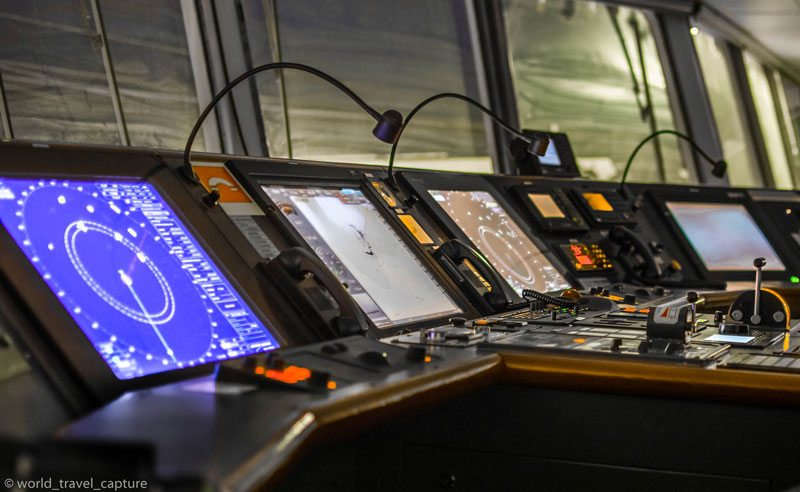
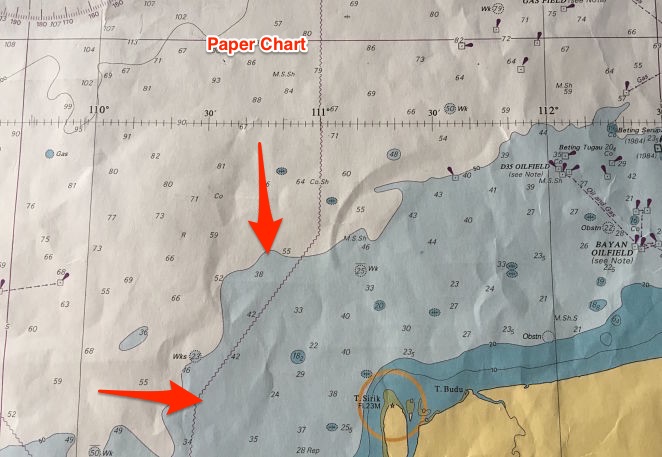
ECDIS Safety Settings ECDIS has been the talk of the town. On every inspection on board, compliance with ECDIS procedures has been top agenda for the inspectors. It will not be a new thing to say that good passage planning is the key for safer navigation. ECDIS now being a part of passage planning contributes to the safe navigation. I had covered ECDIS in lengths earlier on the topic like ordering and correcting ENC Plotting navigational warnings on ECDIS In these two posts I covered about the process of correcting the ENCs. Can we say we are all set if ENCs are corrected for Weekly corrections, T&P corrections, Navigational warnings and navtex warnings ? But what if the settings on the ECDIS are not what it should be. Wrong settings pose even bigger threat to the safe naviagtion than the uncorrected ENCs. In this post I will discuss about the what and how of all the settings on ECDIS. Safety Settings It is all in the name. Safety settings sets the safety parameters according to the ship's static as well as dynamic particulars. That is a change ECDIS brought from the traditional paper charts. For example see this chart and I will ask one question.
Join now to access this article and much more.

Admin has placed this article behind a paywall, making it accessible only with a paid membership, which offers numerous perks:

  • Contribute to creating a platform for reading and writing without ads.
  • Enjoy all content here, including exclusive articles for members.
  • Gain access to all exclusive articles for members.

Comments (80)

  • Krishnan August 20, 2016
    Sir please elobrate abt cat zoc zones
    3
    Rajeev Jassal August 21, 2016
    Categories of Zone of confidence (CATZOC) in a way tells us how accurate the data on the ENCs is. These are divided in different zones like A1 has the depth accuracy of 1% and C has accuracy of 5%. It all reminds us to take extra safety margins. I will try to cover in detail on future posts.
    Raja February 1, 2017
    CATZOCs are increasingly important, in the absence of source data diagrams, to inform mariners about the reliability of the survey data that forms the charts. This is very important check during the passage plan. if you ignore ,may lead to grounding.
  • Muthukkumaran.V August 24, 2016
    Sir,thanks for the post,very clearly explained abt the depth settings,Requesting more info on Ecdis.
    1
    Rajeev Jassal August 25, 2016
    Thank you Muthukkumaran. There are couple of posts on ECDIS. Check them out if these can be of some help.
  • Sagar August 26, 2016
    sir can u tell, technical difference between rescue boat and lifeboat (if using lifeboat as rescue boat) except the hoisting requirement.
    1
    Rajeev Jassal October 16, 2016
    Rescue boat has recovery stropes to recover the lifeboat in heavy weather.
  • Capt. Chander Vart August 27, 2016
    Excellent information. Explained in a very simple and easy to understand manner. Keep it up.
    1
    Rajeev Jassal August 27, 2016
    Thanks bro.. Glad to have you as regular reader..
  • Abbas September 13, 2016
    Good day sir.Thank you very much for passing important informations .I found it very helpful.i wish u to keep writing blogs.It touched my heart the way u are helping others with your vast knowledge.Thank u once again sir.
    1
    Rajeev Jassal September 14, 2016
    Thanks for your kind words Abbas..
  • Aswini Kumar Barnwal November 1, 2016
    Good Day Sir.. It would be very great if you could explain about the isolated danger symbol in shallow waters as they are also a very handy tool for anti grounding alarm in Ecdis.
    2
    Rajeev Jassal November 27, 2016
    I will try to cover in one of the future blog Aswini..
    Capt. Ram December 15, 2016
    Isolated dangers are automatically shown above safety contour i.e. in safe waters. However, they can also be seen below safety contours provided you select feature ''Isolated dangers in shallow water'' in few ECDIS
  • HF Zou November 27, 2016
    Sir, I think it is the funciton of safety contour , instead of your mentioned safety depty. and further more compared with chart example , the safety depth setting should be 14 meters in your example of "Differentiating the safety settings on ECDIS " - This is in case of a shallow depth at one point in the navigable waters. Although we might be navigating in area above safety contour, this isolated depth pose a danger. "Safety depth highlights this danger." tks.
    2
    Rajeev Jassal November 27, 2016
    I think that is exactly what I said in this article.. But if you read under "Safety depth setting" I have explained why safety depth is taken as 11 meters in this case.
    bryan June 9, 2022
    But as the safety depth is 11 meters (which will be below 15 meters contour), we can navigate in the shallow waters provided the depth is above 14 meters. sir i beleive there has been a typo in the above sentence..it should be ""safety depth is 14 meters"" instead of 11...correct me if i am wrong
  • Psingh December 9, 2016
    Good day. Found this quite informative. Just a doubt. In general we keep the safety depth n contour values same. But in any other case safety depth can be greater than the contour values?
    1
    Capt. Ram Bahadur December 15, 2016
    Yes, it can be the case where safety depth can be more than safety contour. However, u have to mark the no go area manually similar to paper charts because there will be unsafe waters when following the above water which will be not subjected to further alarms.
  • Capt.Igor December 21, 2016
    Great job. Thanks. Can the post be done in downloadable way?
    1
    Rajeev Jassal February 5, 2017
    I will try to include that fucntionality in near future..
  • Rehan January 4, 2017
    Very well explained. What about the ports where the tidal range is high as 4-5 m? For example An aframax vessel of 12.5 m and Depth of channel is 13.6 m. Tide at the time of transit = 4.5 m so what would be ideal setting on ECDIS???
    2
    Rajeev Jassal February 5, 2017
    In this case you need to do the calculation basis what charted depth is safe for you. For example if with 12.5 m draft and with all the requirements (Company minimum UKC and squat etc) you require water depth of 14.5 meters. You need to remove the height of tide from it. That means the safety depth to be entered in ECDIS becomes 10 meters. Same method of calculation goes with other settings.
    Sarthak Vohra March 11, 2017
    Sir, I have query regarding shallow contour settings in tidal ports havin 4-5 mtrs of tide for a particular window let say about 10 NM which requires minimum 4 mtrs of tide and the channel is about 50 NM. In this case what should be the settings of Safety depth / contour and shallow contour. Do i need to change ECDIS PARAMETERS again and again for different tidal range or same?? Let say my draft is 10.25 mtr EK and after applying squat and minimum UKC requirement from company my safety depth settings for pilotage waters becomes 13.37 mtrs (Speed 10 knts - squat - 2.62) and minimum UKC 0.5 mtrs. Here what tide to take to calculate my settings because its a 5 hours passage and tide is changing frequently and as i mentioned above for last 10 NM i need minimum 4 mtrs of tide. Can you please clarify? ECDIS parameters settings for sfety depth / contour and shallow contour. Will be highly obliged.
  • Rehan January 4, 2017
    Sir, I would really appreciate your assistance if you please reply to my query asked in the above comment on my email id!
    1
    Rajeev Jassal February 5, 2017
    Let me know if you have any other doubt..
  • Mukesh Mamtora February 25, 2017
    Thank you so much for your blog on safety settings in ecdis.it was really very useful.i had one doubt , is it ok to enter higher values in safety settings or else we should put the exact value which we get from calculation. can inspectors ask us ,that why you have entered little higher values? Thanks
    2
    Rajeev Jassal February 25, 2017
    Yes you can put higher values as long as you do not sail on danger depths for these higher values. For example if your safety depth is 10 meters and you put a higher safety depth value of 20 meters. Now if have sailed over 15 meter depth (unsafe as per safety settings but safe in real) then it will be considered as a matter of concern because you will no longer be able to distinguish between safe and unsafe depths. But if you are following those higher value of settings, like in this case you actually want to be in depths over 20 meters, you can do that and no one should question these higher safety setting values.
    Mukesh Mamtora February 25, 2017
    Tysm sir for your reply..
  • sarthak vohra March 11, 2017
    Sarthak Vohra 2 mins ago Sir, I have query regarding shallow contour settings in tidal ports havin 4-5 mtrs of tide for a particular window let say about 10 NM which requires minimum 4 mtrs of tide and the channel is about 50 NM. In this case what should be the settings of Safety depth / contour and shallow contour. Do i need to change ECDIS PARAMETERS again and again for different tidal range or same?? Let say my draft is 10.25 mtr EK and after applying squat and minimum UKC requirement from company my safety depth settings for pilotage waters becomes 13.37 mtrs (Speed 10 knts - squat - 2.62) and minimum UKC 0.5 mtrs. Here what tide to take to calculate my settings because its a 5 hours passage and tide is changing frequently and as i mentioned above for last 10 NM i need minimum 4 mtrs of tide. Can you please clarify? ECDIS parameters settings for sfety depth / contour and shallow contour. Will be highly obliged.
    1
    Rajeev Jassal April 30, 2017
    In this case you either you need to change the settings again and again or you can just calculate and ensure that you have sufficient UKC and keep the same settings. This is a particular situation but the idea is that we need to be sure of our UKC and in this case we need to be very attentive as the information could be misleading.
  • Nish Walker March 15, 2017
    Hi sir, it's a great article. i've referred to many ECDIS Articles before Venturing into yours, couldn't help noticing most of those article said Deep Contour is to indicate the waters upon which a vessel experience squat, well it doesn't make any sense because Deep contour is twice the ship's deepest draft and safety contour(indicates safe waters) is ship's draft+Squat+UKC+CATZOC, which is obviously lower value than deep contour. So when a vessel sailing in safety contour would not squat let alone aground* but she will experience squat in Deep contour??. To put that in perspective a vessel could exp squat in deep contours , when she sails towards safety contours only to experience more or much worse!! . Maybe I've gotten it all wrong !! Pls correct me if i'm wrong.
    1
    Rajeev Jassal April 30, 2017
    You are right Nish..
  • Jun March 27, 2017
    Gud day Captain! can you kindly give me your opinion about these formula which I got from an NK surveyor in Brisbane. Safety contour = (Draft + UKC) - Height of tide and, Safety Depth = (Draft + Squat + safety (as per company)) - Height of tide. thanks for replying, God bless.
    1
    Rajeev Jassal April 30, 2017
    It is right about Safety Depth but safety contour will be same as safety depth as it automatically takes the next available contour.
  • M LAKSHMI NARAYANA April 29, 2017
    SIR SIMPLY SUPER,VERY HELPFUL,U HAVE VAST KNOWLEDGE ON DIFFERENT TOPICS,THANK U VERY MUCH
    1
    Rajeev Jassal April 30, 2017
    Thank you for being a reader ..
  • Buenfil Bas May 25, 2017
    Thanks for this post,.
    1
    Rajeev Jassal August 28, 2017
    Thank you for reading Buenfil...
  • Sandeep Vithal Band June 9, 2017
    Oh I just finish Ecdis course over here without spending Single Penny. Many thanks Capt. Rajeev Jassal . You are doing great job.
    1
    Rajeev Jassal August 28, 2017
    Glad to hear that Sandeep...
  • viswanathan venkatesan June 23, 2017
    Nice Explanation sir. Can you explain about Limiting Danger Line (LDL) in detail sir.
    0
  • Freddy Nitash August 2, 2017
    Sir can you help about confirmation display of ECDIS Chart1 (PL4.0) for ECDIS JRC JAN-901B, procedure how to demonstrate.
    0
  • Amit Rathi August 9, 2017
    How to check CATZOC on JRC ECDIS 901B, plz comment ...!!
    0
  • Moi ty August 27, 2017
    Thanks sir for sharing ideas
    1
    Rajeev Jassal November 17, 2017
    Thanks Moi...
  • ARVIND KUMAR SOORADA September 26, 2017
    Thanks a lot. Im preparing for my masters in uk. Your article did helpe me and im sure will help a lot of people in the future too . Keep up your hardwork.
    1
    Rajeev Jassal November 17, 2017
    Glad you found it helpful Arvind...
  • Ivor November 17, 2017
    Hi Capt. Jassal, I have not read your entire article - going no further than: "To enter a value for these settings on JRC ECDIS, go to chart -> settings and then choose “S-57/C-Map/ARCS." My comment is about 'ARCS' - Admiralty Raster Chart Service; I think in this regard a little more clarity is required in your article. It is pointless to set Safety Contours etc on Raster Charts - the contour alarms won't work in RCDS Mode. Many thanks
    1
    Rajeev Jassal November 17, 2017
    Hi Ivor, that option is the only option in JRC ECDIS for entering the safety settings. When I wrote “choose S-57/C-Maps/ARCS”, I am only highlighting the option to choose to set the safety settings and I am not implying that it will work on Raster charts.
  • RAJAT December 16, 2017
    Very easy to understand practically from now....Thanks and keep writing good stuff.... Please start utube videos also....As there is very limited stuff in utube.
    0
  • Rinkal Rana December 25, 2017
    Thank you so much for sharing your in depth knowledge on various topics. Its really of great help as well as clearing up ambiguities.
    0
  • RecallAlarams March 14, 2018
    Awesome, Thank you so much for sharing such an awesome blog... boat safety alert services boat recall alerts
    0
  • Surendra thakur April 16, 2018
    Hi, Capt your blog is very informative for me. I appreciate all your hard working for this article. Thank you so much for this.
    0
  • Giorgi Makhadze May 11, 2018
    Nice job,many thanks.
    0
  • PANKAJ GAUTAM June 13, 2018
    VERY HELPFUL..NICELY ELABORATED..
    0
  • Lahiru Janeth Silva June 17, 2018
    Very helpful article.
    0
  • Anvi July 2, 2018
    Hello sir.,your article was very useful..written in very simple language to understand ecdis so nicely., thank you. I have doubth about overlapping of chart. Can u pls help me with it. How do I separate it? Or transfer my course while passage plan. It was asked by surveyors in MMD.
    0
  • Neeraj Verma September 18, 2018
    Sir can you pls explain, on which shade (Two colour or Four colour), it is safe to navigate.
    0
  • prem September 20, 2018
    Thanks sir, very useful
    0
  • Suresh Bishnoi November 2, 2018
    Thankyou sir for useful information Sir some books says safety depth= draft+ukc+squat-hight of tide Sir in ports like mundra where tide is more than 7-8 m how it ll give good result. Assume my draft is 8 m 2m ukc nd 2 m squat HOT is 8 m So Safety depth= 8+2+2-8= 4m How its possible. And not one book But all books saying same formulla Plz guide regarding this.
    0
  • ravneet brar November 7, 2018
    good day sir, could u pls shed some light about the limitations of using ECDIS in RCDS mode. and how is the display change in RCDS mode in JRC 901 b ECDIS
    0
  • Mohd Moqeem Ahmad January 14, 2019
    You have great knowledge. Thank you sir
    0
  • ramo March 21, 2019
    Good day captain! thank you very much for sharing your great knowledge.
    0
  • John Marvin October 9, 2019
    Good Explanation indeed, However I have a question below. On what basis you will set your look ahead sectors?
    0
  • Jade November 27, 2019
    Good day. Are there any regulations for standard setting of guard zone (vector/sector) coverage? Thanks
    0
  • Nikhil March 20, 2020
    Sir which alarms on ecdis we can not turn off?
    0
  • Mark hussein May 10, 2020
    Capt. Thank you for your tips its very useful for all seafarers
    0
  • Manoj June 12, 2020
    Dear sir My querry regarding t n p on Ecdis as t n p is automatic updated in ecdis on weekly basis with enc update , but if the surveyor ask show me the latest t n p on ecdis,how i should go about it pls explain ..
    0
  • ADI July 15, 2020
    Thank you so much for sharing your in depth knowledge.My doubt is when will ECDIS look ahead feature show wrong reading?
    0
  • Jayson Ray B. Consad July 18, 2020
    Your a legend the way you explained...gifted... matsalam
    0
  • PLACIDO VICENTE July 23, 2020
    Thank you Capt Rajeev a very nice explaination. I hope next also for tokyo keiki ECDIS
    0
  • Prakash October 4, 2020
    Dear Capt, You are the google of global seafarer society.Kindly elaborate about the static draft and dynamic draft on your words.Thank you sir.
    0
  • Joel pontanoza December 13, 2020
    Sir what is the importance of proper srtting-upof ECDIS safety display atleast 5 example.
    0
  • nims December 13, 2020
    Hey There. I found your blog using msn. This is a very well written article on health and safety.I will make sure to bookmark it and return to read more oof your useful info. Thanks for the post. I’ll certain comeback.
    0
  • Hernan Bagaforo January 20, 2021
    Sir good day, Why there depths are displayed in bolt and normal figure in tha waters with less than displayed Safety Contour?
    0
  • Robin April 3, 2021
    Assalamualaikum. Well-done sir. Would you give me JRC ECDIS manual on the basis of your answer?
    0
  • John Macaya January 5, 2022
    What is the best setting of shallow contour? same as max draft? or should be set at the closest available contour, even if this contour is less than the vessel draft.
    0
  • Slavian511 April 24, 2023
    Please could you explain how to calculate anti-grounding cone for vsl?
    0
Capt Rajeev Jassal

About Capt Rajeev Jassal

Capt. Rajeev Jassal has sailed for over 24 years mainly on crude oil, product and chemical tankers. He holds MBA in shipping & Logistics degree from London. He has done extensive research on quantitatively measuring Safety culture onboard and safety climate ashore which he believes is the most important element for safer shipping.

More like this

In blog, Ship Navigation

Here is What a brilliant Passage plan on ECDIS Looks Like

We have come a long way since ECDIS was brought into our lives. In the initial days we were just…

In blog, Marine Conventions

IMO Sulphur 2020 and FONAR: All you need to know

IMO Sulphur 2020 has been the keyword for the year 2019. Rightly so. After all, the deadline for switching over…

In blog, Ship Safety & Security

Why crew accommodations size is reducing on ships ?

Most would agree that crew accommodation size is continuously reducing onboard new ships. Many of us have seen big crew…

In blog, Cargo Operation

How confident are you about your ODMCS ?

Before we come to ODMCS tests, it is better to first do a recap on the requirements of ODMCS. ODMCS (Oil…

In blog, Marine Conventions

New Indian MS bill, DG shipping starts issuing SID and other stories of November 2016

Each month we bring only the main stories of the maritime field. These stories are carefully chosen to have only…

In blog, Marine Conventions, Ship Safety & Security

A Guide to transit through Gulf of Aden and Somalian waters

If you think the piracy and hijacking in the Gulf of Aden is dead now, you need to think again. Yes,…